ADVERTISEMENT

Canva Code 2.0 is now available in the Philippines

Published Jul 27, 2026 11:21 am
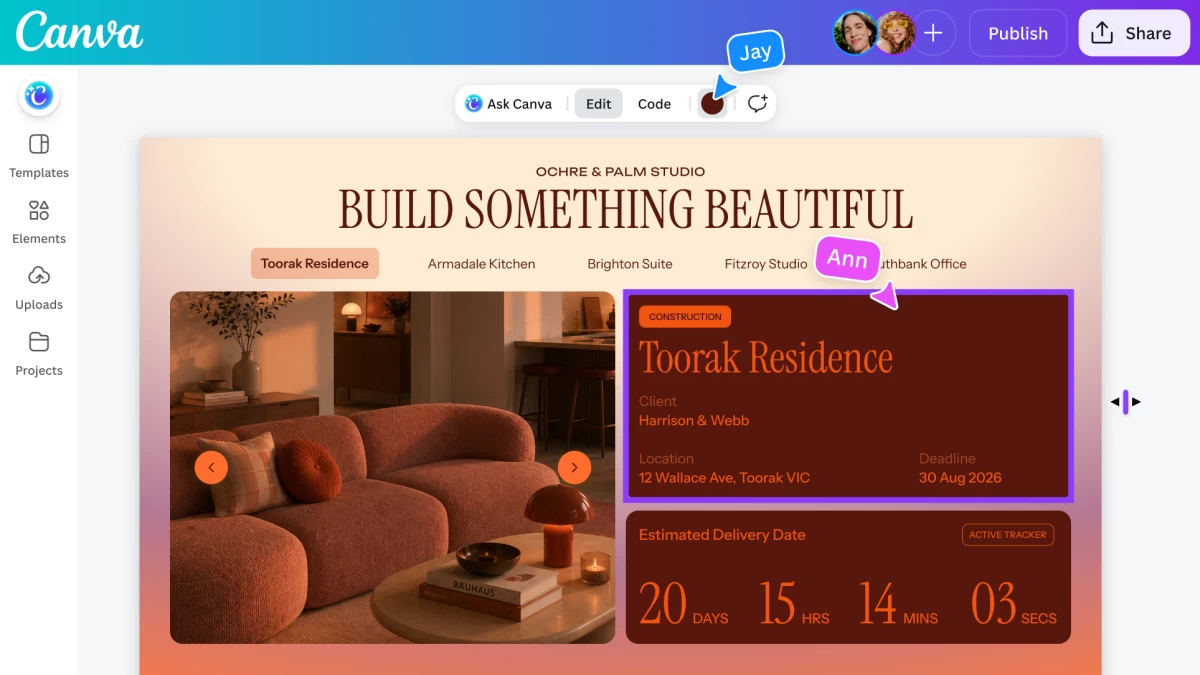
With the rollout of Canva Code 2.0 in the Philippines, Canva is making AI-powered coding more accessible, allowing Filipinos to build websites with zero to minimal coding experience.
A decade ago, Canva transformed design with its intuitive drag-and-drop editor, making creativity accessible to everyone. Today, Canva is doing the same for coding. One of AI's most exciting capabilities is vibe coding—the practice of turning plain-language prompts into working apps or websites. As AI tools become more accessible, vibe coding has quickly evolved from a specialized developer tool into a creative medium for everyone.
Since its introduction last year, Canva Code has enabled users around the world to build everything from classroom hubs and interactive lessons to real estate listings and learning games. The tool is now faster than ever: average code generation time has been reduced by 75% to just 45 seconds, while the median time to publish a site has decreased by 30%. With active users jumping 25% since its recent update, the momentum signals growing demand for AI coding tools that go beyond generating code to helping people build polished, personalized interactive experiences.
Today, Canva Code 2.0 is available to over a quarter of a billion people designing with Canva every month—including millions of creative users in the Philippines. Whether starting from a simple prompt, one of more than 50 ready-made templates, or existing HTML from another AI tool, users can now build directly within Canva projects such as presentations, whiteboards, and other designs, without starting from scratch.
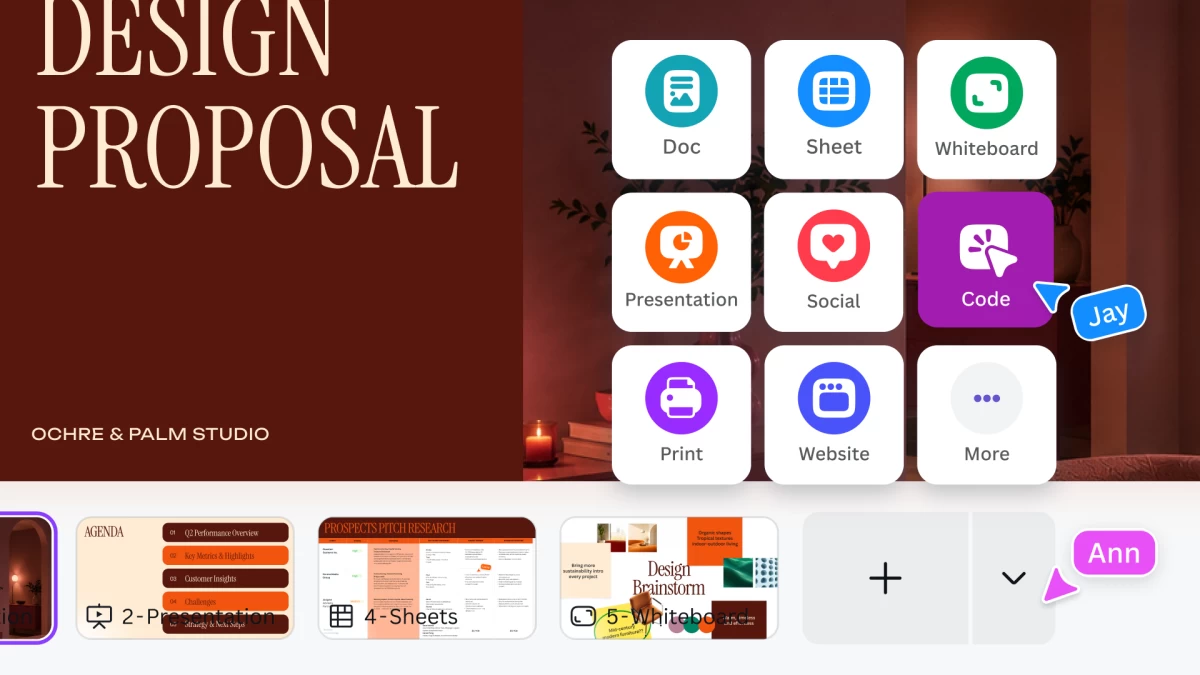
Make Interactive Designs Yours, Effortlessly
Interactive experiences transform passive viewers into active participants, creating more engaging and memorable digital experiences. As more people embrace AI coding tools, the challenge is no longer generating code, it's creating experiences that truly reflect their vision.
Most vibe coding tools stop at functionality, producing outputs that often look and feel the same. While users can generate a working prototype, making it look uniquely their own often requires separate design software, developer support, or repeated prompting.
Canva Code bridges that gap by bringing AI-powered coding directly into Canva's familiar editor. Once an experience is generated, users can edit it just like any Canva design—updating text, fonts, colors, and layouts, swapping in images from Canva's extensive media library or their own uploads, or refining specific elements using conversational AI. Users can also import HTML from other AI assistants and continue editing where they left off instead of rebuilding from scratch. The result is an interactive experience that doesn't just work—it looks and feels like it came from you.
Built to be automatically responsive across devices, Canva Code enables teams to build, review, and refine together in real time before publishing to a custom domain, sharing securely through Single Sign-On (SSO), or connecting with tools like Canva Sheets to collect and manage data—all within a single collaborative workflow.
Creating with Code: Real Results from the Canva Community
Globally, Canva AI products have been used more than 32 billion times, with usage tripling over the past year alone. Canva Code has powered the creation and publication of more than six million websites in just one year.
Educators and school administrators in the Philippines are embracing Canva Code to create interactive classroom hubs and engaging learning materials that simplify complex lessons and adapt to evolving curricula. By serving as an AI-powered teaching assistant, Canva Code is helping Filipino educators enhance their teaching methods and create more engaging learning experiences for students. In Spain, a global cohort of 50 educators even created interactive learning games mapped to pedagogical goals using Canva Code during World Book Day.
Beyond education, entrepreneurs and small businesses are using Canva Code to build interactive customer experiences—from planning tools and fundraising resources to marketing websites and community engagement platforms—without writing a single line of code.
Empowering Everyone to Shape the Future of Design
Canva Code is a building block for a whole new way to create, design, and build. As part of Canva AI, it advances Canva's long-term vision of empowering anyone to create anything they can imagine while removing technical barriers that have traditionally limited creativity.
For the millions of Canva users across the Philippines helping drive the country's vibrant creator economy, Canva Code unlocks a new way to turn ideas into websites, apps, and interactive experiences that are both functional and uniquely their own. As Canva continues to expand beyond traditional design, it's making the future of creation more accessible than ever.
Canva Code 2.0 is now available globally and across the Philippines for all Free, Pro, Business, Enterprise, and Education accounts.

Related Tags

Canva Canva Code Canva Code 2.0
ADVERTISEMENT
.most-popular .layout-ratio{ padding-bottom: 79.13%; } @media (min-width: 768px) and (max-width: 1024px) { .widget-title { font-size: 15px !important; } }

{{ articles_filter_1561_widget.title }}

.most-popular .layout-ratio{ padding-bottom: 79.13%; } @media (min-width: 768px) and (max-width: 1024px) { .widget-title { font-size: 15px !important; } }

{{ static_articles_1562_widget.title }}

.most-popular .layout-ratio{ padding-bottom: 79.13%; } @media (min-width: 768px) and (max-width: 1024px) { .widget-title { font-size: 15px !important; } }

{{ articles_filter_1563_widget.title }}

{{ articles_filter_1564_widget.title }}

.mb-article-details { position: relative; } .mb-article-details .article-body-preview, .mb-article-details .article-body-summary{ font-size: 17px; line-height: 30px; font-family: "Libre Caslon Text", serif; color: #000; } .mb-article-details .article-body-preview iframe , .mb-article-details .article-body-summary iframe{ width: 100%; margin: auto; } .read-more-background { background: linear-gradient(180deg, color(display-p3 1.000 1.000 1.000 / 0) 13.75%, color(display-p3 1.000 1.000 1.000 / 0.8) 30.79%, color(display-p3 1.000 1.000 1.000) 72.5%); position: absolute; height: 200px; width: 100%; bottom: 0; display: flex; justify-content: center; align-items: center; padding: 0; } .read-more-background a{ color: #000; } .read-more-btn { padding: 17px 45px; font-family: Inter; font-weight: 700; font-size: 18px; line-height: 16px; text-align: center; vertical-align: middle; border: 1px solid black; background-color: white; } .hidden { display: none; }
function initializeAllSwipers() { // Get all hidden inputs with cms_article_id document.querySelectorAll('[id^="cms_article_id_"]').forEach(function (input) { const cmsArticleId = input.value; const articleSelector = '#article-' + cmsArticleId + ' .body_images'; const swiperElement = document.querySelector(articleSelector); if (swiperElement && !swiperElement.classList.contains('swiper-initialized')) { new Swiper(articleSelector, { loop: true, pagination: false, navigation: { nextEl: '#article-' + cmsArticleId + ' .swiper-button-next', prevEl: '#article-' + cmsArticleId + ' .swiper-button-prev', }, }); } }); } setTimeout(initializeAllSwipers, 3000); const intersectionObserver = new IntersectionObserver( (entries) => { entries.forEach((entry) => { if (entry.isIntersecting) { const newUrl = entry.target.getAttribute("data-url"); if (newUrl) { history.pushState(null, null, newUrl); let article = entry.target; // Extract metadata const author = article.querySelector('.author-section').textContent.replace('By', '').trim(); const section = article.querySelector('.section-info ').textContent.replace(' ', ' '); const title = article.querySelector('.article-title h1').textContent; // Parse URL for Chartbeat path format const parsedUrl = new URL(newUrl, window.location.origin); const cleanUrl = parsedUrl.host + parsedUrl.pathname; // Update Chartbeat configuration if (typeof window._sf_async_config !== 'undefined') { window._sf_async_config.path = cleanUrl; window._sf_async_config.sections = section; window._sf_async_config.authors = author; } // Track virtual page view with Chartbeat if (typeof pSUPERFLY !== 'undefined' && typeof pSUPERFLY.virtualPage === 'function') { try { pSUPERFLY.virtualPage({ path: cleanUrl, title: title, sections: section, authors: author }); } catch (error) { console.error('ping error', error); } } // Optional: Update document title if (title && title !== document.title) { document.title = title; } } } }); }, { threshold: 0.1 } ); function showArticleBody(button) { const article = button.closest("article"); const summary = article.querySelector(".article-body-summary"); const body = article.querySelector(".article-body-preview"); const readMoreSection = article.querySelector(".read-more-background"); // Hide summary and read-more section summary.style.display = "none"; readMoreSection.style.display = "none"; // Show the full article body body.classList.remove("hidden"); } document.addEventListener("DOMContentLoaded", () => { let loadCount = 0; // Track how many times articles are loaded const offset = [1, 2, 3, 4, 5, 6, 7, 8, 9, 10]; // Offset values const currentUrl = window.location.pathname.substring(1); let isLoading = false; // Prevent multiple calls if (!currentUrl) { console.log("Current URL is invalid."); return; } const sentinel = document.getElementById("load-more-sentinel"); if (!sentinel) { console.log("Sentinel element not found."); return; } function isSentinelVisible() { const rect = sentinel.getBoundingClientRect(); return ( rect.top < window.innerHeight && rect.bottom >= 0 ); } function onScroll() { if (isLoading) return; if (isSentinelVisible()) { if (loadCount >= offset.length) { console.log("Maximum load attempts reached."); window.removeEventListener("scroll", onScroll); return; } isLoading = true; const currentOffset = offset[loadCount]; window.loadMoreItems().then(() => { let article = document.querySelector('#widget_1690 > div:nth-last-of-type(2) article'); intersectionObserver.observe(article) loadCount++; }).catch(error => { console.error("Error loading more items:", error); }).finally(() => { isLoading = false; }); } } window.addEventListener("scroll", onScroll); });

Sign up by email to receive news.