






Manila Bulletin
 Technews
Safari's privacy fortress: How Apple is writing the rules with their browser
Technews
Safari's privacy fortress: How Apple is writing the rules with their browser
Technews
Safari's privacy fortress: How Apple is writing the rules with their browser
Safari's privacy fortress: How Apple is writing the rules with their browser
From blocking every third-party cookie to hiding your IP address, Safari has quietly become a privacy-forward major browser on the market
Published Jun 4, 2026 12:38 pm


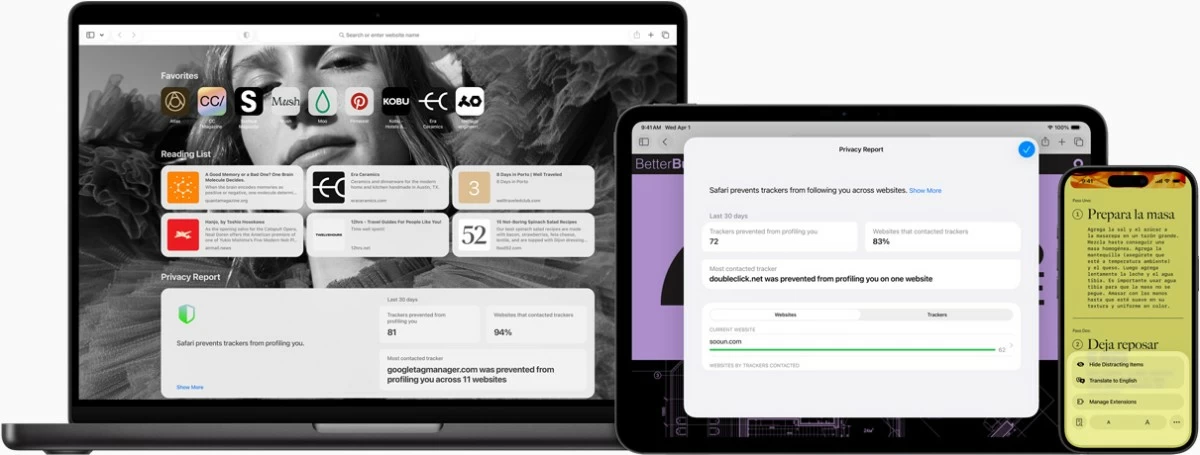
In a digital landscape where user data has become a commodity, Apple's Safari browser is staking a powerful claim: That speed, efficiency, and genuine privacy protection can coexist, and that your browser shouldn't be working against you.
Safari, the default browser on every iPhone, iPad, and Mac, has long been overshadowed in the browser wars by that other browser's market dominance. But a closer look at Apple's flagship browser reveals a product that has quietly outpaced its rivals on the two dimensions that matter most to many modern users: Privacy and battery life.
Safari is engineered from the ground up for Apple hardware, and the performance difference is measurable. Independent testing shows Safari delivers up to five hours more battery life when streaming video a significant advantage for laptop users who spend long hours away from a charger.
For millions of MacBook users that means the difference between making it through a transatlantic flight or reaching for a power adapter mid-journey. Safari's tight integration with Apple Silicon and macOS gives it an efficiency edge no cross-platform browser can easily replicate.
Intelligent Tracking Prevention: Machine learning against surveillance
Safari's most technically sophisticated privacy feature is Intelligent Tracking Prevention, let's call it ITP. Using on-device machine learning, ITP identifies advertising trackers across the web, immediately purges their data, and hides users' IP addresses from known trackers before a connection is even established.
The tool is not passive. Safari's built-in Privacy Report gives users a real-time view of exactly how many trackers have been blocked on every website they visit, turning an invisible privacy battle into a transparent one. For many users, the numbers are a revelation.
Safari privacy features at a glance
Blocks all third-party cookies by default since 2019
ITP uses machine learning to identify, block, and immediately delete tracker data
Anti-Fingerprinting presents a generic device profile to data companies to foil identification
iCloud+ Private Relay hides IP across all browsing traffic, invisible even to Apple
Link Tracking Protection strips tracking parameters appended to URLs
Private Browsing tabs can be locked behind Face ID or Touch ID
Anti-fingerprinting: defeating the surveillance workaround
As browser makers began restricting cookies, advertising companies developed a subtler technique: device fingerprinting. By harvesting innocuous-seeming details, screen resolution, system fonts, graphics hardware configuration, trackers can build a unique identifier for a device without placing a single cookie.
Safari's Anti-Fingerprinting feature intercepts requests for device characteristics and returns a simplified, blended response.
iCloud Private Relay: A two-hop architecture for true anonymity
For iCloud+ subscribers, Safari goes further still with Private Relay, a feature that routes all browsing traffic through two separate internet relays operated by different companies. The architecture ensures that neither the user's network provider nor Apple itself can see both who the user is and what websites they are visiting simultaneously.
This is a meaningful distinction from conventional VPNs, where a single provider sees everything. Private Relay's split-knowledge design means no single entity holds the complete picture, a significant privacy guarantee for users conducting sensitive research or browsing in restrictive environments.
Extensions that respect users
Browser extensions have long been a privacy liability. Invasive extensions on competing platforms have been caught reading passwords, intercepting credit card data, and surveilling browsing history at scale. Safari takes a different approach.
Before any extension gains access to a webpage, Safari surfaces a clear disclosure of exactly what data the extension wants to read. Users can then approve access for all websites, restrict it to specific domains, or grant a single-day permission that automatically expires. It is a consent model that treats extension access as the exception, not the default.
Private Browsing that actually works
Safari's Private Browsing mode addresses a quiet but widespread frustration: Most "private" modes do not actually stop tracking. They prevent local history from being saved, but trackers, advertisers, and network providers can still follow users across the session. Safari's Private Browsing applies the full stack of its privacy protections, tracker blocking, fingerprinting resistance, and Link Tracking Protection, which automatically strips the tracking parameters websites append to URLs to identify individuals.
Users can also set a different default search engine specifically for Private Browsing sessions, useful for those who want the convenience of a mainstream search engine day-to-day, but prefer a privacy-preserving alternative when they need it most. Private tabs can be locked behind Face ID or Touch ID, ensuring that sensitive sessions remain inaccessible even when a device is handed to someone else.
The bigger picture
Safari's privacy roadmap tells a story of consistent, years-ahead-of-market decisions: Blocking third-party cookies in 2019, rolling out ITP when most browsers were still debating whether tracking was a problem worth solving, and building Anti-Fingerprinting when rival browsers had no comparable feature at all.